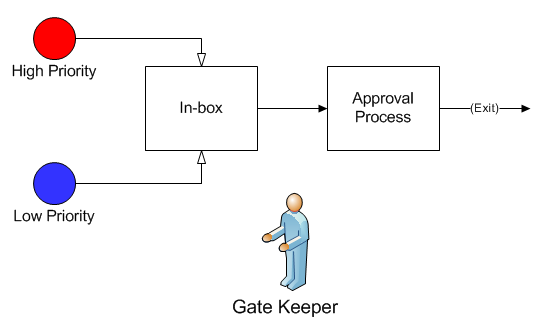
If two or more different activities feed to another activity that is currently unavailable, you may want to prioritize the order in which routings get access to the activity when it becomes available.
The model used for this example, as well as all of the modeling "how-to" examples, can be found in the ProModel Solutions Café (http://www.promodel.com/solutionscafe/howto/). A video demonstrating this solution can be found here.
*Since Logic statements are executed BEFORE any activity time that is defined in the Activity dialog, be sure to define any activity time in the Logic Builder instead of using the Activity Time field.
Two different claim forms (High Priority and Low Priority) are routed from an Incoming box (with no activity time) to an Approval process, but you always want to allow the High Priority claim forms to route first.
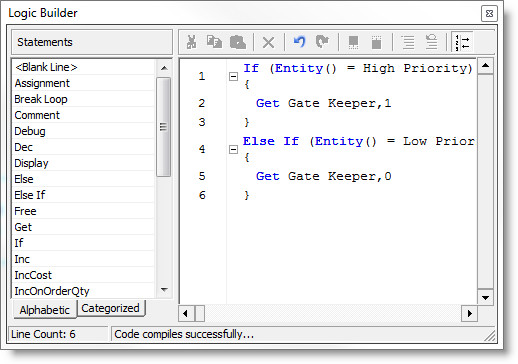
Logic builder for the In-box activity.
Logic builder for the Approval Processing activity.
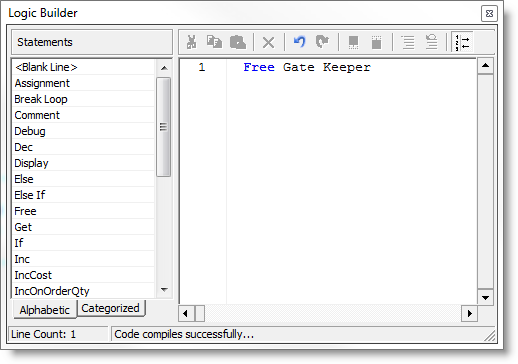
Notice that a resource called Gate Keeper has been defined to regulate which claim form gets to route from Incoming to the Approval process first. In the Logic Builder of the Incoming activity, if the entity is a High Priority claim, it gets the Gate Keeper with a priority of 1; otherwise, it will get the Gate Keeper with a priority of 0. In the Approval activity the Gate Keeper is freed.
© 2014 ProModel Corporation • 556 East Technology Avenue • Orem, UT 84097 • Support: 888-776-6633 • www.promodel.com