After completing a particular activity, it may be desirable to change the name or graphical representation of the entity being processed.
Please note: The graphical representation for an entity is changed by changing the entity name and using the graphic associated with that entity. So whether changing an entity name or its graphic, a new entity and associated graphic must be defined.
The model used for this example, as well as all of the modeling "how-to" examples, can be found in the ProModel Solutions Café (http://www.promodel.com/solutionscafe/howto/).
Please note: If you want the entity statistics to be recorded by a name other than the current entity name, change the entity to the desired name when you route it to Exit.
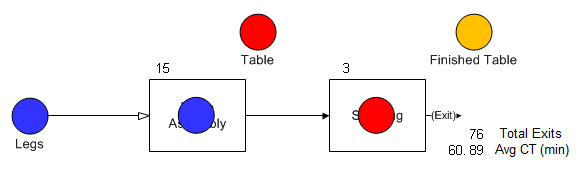
Legs are assembled to a Table Top resulting in a completed Table going to the Shipping Area. You want to change the graphic after the assembly activity to appear as a Table.
This is how the model appears during the simulation.
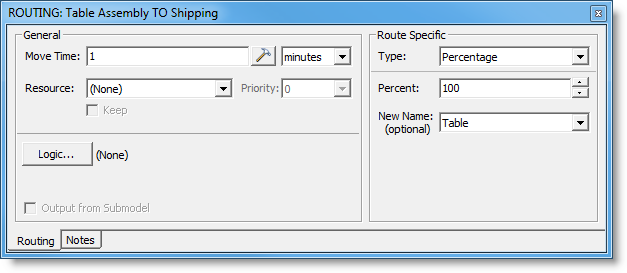
In the routing Properties dialog going from Table Assembly to Shipping, the entity name has been changed to Table.
© 2011 ProModel Corporation • 556 East Technology Avenue • Orem, UT 84097 • Support: 888-776-6633 • www.promodel.com