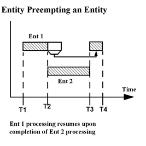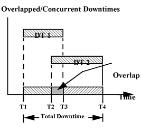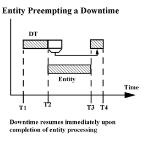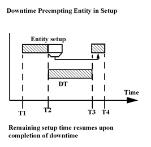
Priorities determine which entity or downtime uses a location when more than one entity or downtime is contending for it. Priorities may be any value or expression between 0 and 999, with higher values having higher priority. For simple prioritizing, you should use priorities from 0 to 99. Priorities greater than 99 are used for preempting (bumping or displacing) entities or downtimes currently occupying a location.
Priority values are divided into ten levels (0 to 99, 100 to 199, ..., 900 to 999), with values beyond 99 used for preempting entities or downtimes of a lower priority level. Multiple preemptive levels make it possible to preempt entities or downtimes that are themselves preemptive. This means that an entity, EntA, with a priority of 99 can be preempted by another entity, EntB, with a higher priority level of 199. In turn, another entity, EntC, with a priority of 299 can preempt EntB at the same location.
To preempt an entity currently using a location, a preempting entity or downtime must have a priority at least ONE level higher than the entity currently at the location. To preempt a downtime in effect at a location, a preempting entity must have a priority at least TWO levels higher than the current downtime. Since all overlapping location downtimes are processed concurrently (except setup downtimes), a downtime cannot, in effect, preempt another downtime.
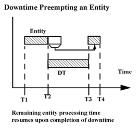
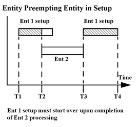
A preempted entity will resume processing where it left off unless the location was in the middle of a setup downtime. If the entity initiated a setup downtime before being preempted, it will begin processing the setup logic from the beginning when it resumes.
An entity or downtime accesses a location based on its priority. An entity is assigned a priority for accessing a location in the Destination column of the Routing edit table. A downtime is assigned a priority in the appropriate Downtime edit table. The first of the following examples shows a priority of 100 assigned to EntA as it tries to claim Loc2. This priority is high enough to preempt any entity at the location having a priority less than 100. It is not high enough, however, to preempt any downtimes at the location.
Process Table
|
Entity... |
Location... |
Operation (min)... |
|
EntA |
Loc1 |
USE Res1 FOR N(3,.1) |
Routing Table
|
Output... |
Destination... |
Rule... |
Move Logic... |
|
|
1 |
EntA |
Loc2, 100 |
First 1 |
MOVE FOR 1 |
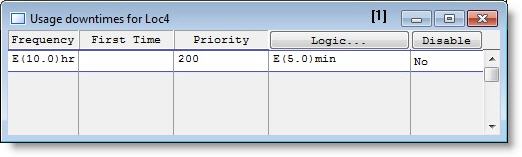
This example shows a priority of 200 assigned to a usage-based downtime at Loc4. This priority can preempt any entity at the location with a priority less than 200.
The following table shows the minimum priority level requirements for an incoming entity or an upcoming downtime to preempt the current entity or downtime at the location.
|
|
To preempt the Current Entity |
To preempt the Current downtime |
|
Incoming Entity |
1 priority level higher |
2 priority levels higher |
|
Upcoming Downtime |
1 priority level higher |
Downtimes overlap |
The following examples demonstrate the explanations above in greater detail.

|
© 2012 ProModel Corporation • 556 East Technology Avenue • Orem, UT 84097 • Support: 888-776-6633 • www.promodel.com |